

This article walks you through five simple steps to convert your On-Premise Sugar instance from Sugar Professional to Enterprise for our On-Premise customers. Sugar Professional instances hosted on SugarCloud will be updated automatically and no actions need to be taken on your part.
Note: If you work with a Sugar authorized partner, please contact your partner directly before following the steps below. Your partner will be able to review your Sugar instance and provide guidance on the proper series of steps applicable to your instance.
The steps to unlock the power of Enterprise
Identify your Sugar Professional version
- Check your current Sugar instance version by visiting "User Icon -> About" within Sugar, or inspecting the file named sugar_version.php, located in the main Sugar folder where your instance is installed.
- Regardless of which approach you use, you will need to note the Sugar Flavor (will be set to PRO for Sugar Professional customers) and your version number (e.g. 9.2.1). Knowing the full version is important as you will need that information when choosing the conversion files to download.
- Verify that you are on a Supported Sugar version by visiting this Support Platforms
- If yes, you are good to continue to the next step!
- If no, we suggest you upgrade to a minimum supported version before continuing with the conversion. If you decide to move forward with an unsupported version, you may find that conversion files are not available for download for your version in the Downloads Store. If that is the case for your scenario, you will need to contact the Sugar Support Team to get the appropriate conversion package for your instance.
Downloading Conversion Package
Sugar's conversion package is available to you on SugarCRM's download store.
- Select "Enterprise" on Downloads dropdown
- Choose Major (on-premises) version (e.g. 11.0.4) (patch versions also have conversion packages)
- Download "SugarPro-to-SugarEnt-Conversion-*.zip" Backup your instance database and filesystem
Make sure your database is fully backed up. Conversion scripts apply changes to the database that cannot be easily reverted or undone. If an issue surfaces causing the conversion to fail, you will need to utilize your backup to restore the database. Information on the changes to the schema can be found in our ApiDocs website. This article provides some good insights and guidelines for backing up your database: Moving Sugar to Another Server.
Take a backup of your instance's file system by copying it, using tar, or any other strategy you'd like to go with, just make sure you also include your uploads folder (if not in the same directory). The process used is not important, so long as the backup includes the full contents of your Sugar and uploads folders.
Go Convert!
At this point, you have safely stored your instance backups, and you're now ready to begin the conversion from Sugar Professional to Sugar Enterprise. However, we strongly advise you to perform this conversion step in a test/sandbox environment first before executing it in a production environment. This will allow you to identify and address any issues or conflicts that may arise, ensuring a smooth transition to Sugar Enterprise. The health check scanner will run as part of the conversion process to ensure that your instance is suitable for conversion. If any issues (red flags) are detected that are deemed incompatible for conversion, the health check will fail and you will not be able to proceed with the conversion until the issues have been resolved.
Use the following steps to convert your Sugar instance from Professional to Enterprise:
- Navigate to Admin > Upgrade Wizard.
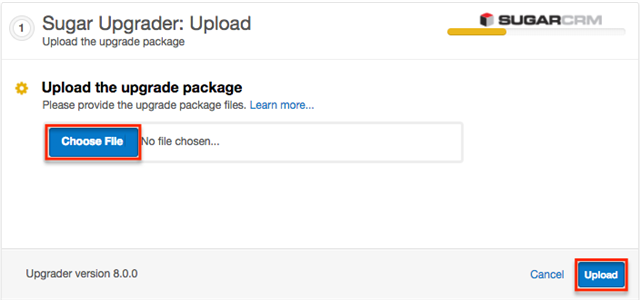
- In Step 1 of the upgrade wizard, click the Choose File button and select the conversion package from your local machine then click "Upload". The health check will now begin to run.
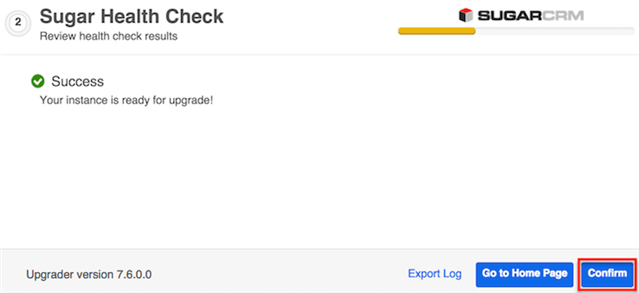
- Step 2 of the upgrade wizard will display the health check results marked by different colored icons. Click "Confirm" to proceed with the conversion.
Note: The Confirm button will be disabled if any issues deemed incompatible for conversion are detected.- Green Checkmark: Health check passed. Any customizations detected in your instance marked with a green checkmark will be converted properly.
- Yellow Ellipsis: Health check passed. Output is generated for issues that require attention. Should you choose to proceed with the conversion despite warnings, keep in mind the following:
- Your instance may contain customizations that will prevent certain modules from getting converted to Sugar's Sidecar user interface, leaving them with the Legacy user interface.
- Your customizations may be modified or disabled to facilitate the conversion.
- Red Exclamation: Health check failed. Any issues deemed incompatible for conversion will need to be resolved before proceeding. Click the Export Log button to view the log file and troubleshoot the issue.
Refer to the Troubleshooting Health Check Output section of the knowledge base for details on resolving health check errors.
- A progress bar will display on the following screen showing each step (Upload the upgrade package, Healthcheck, Pre-upgrade, Upgrade, etc.) being completed. Once the conversion is completed successfully, click the Go to Home Page button.
Note: You can click the Export Log button if you wish to view the log file for the conversion.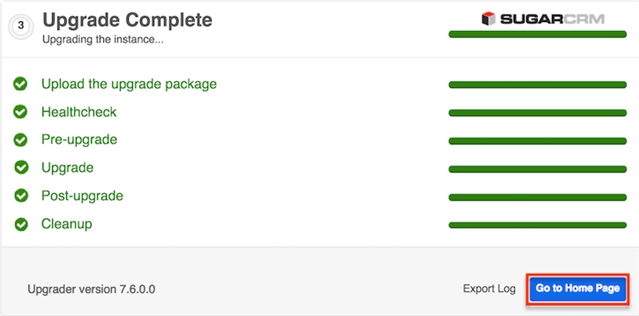
- Navigate to the About page in Sugar and it should now display your Sugar version with the letter "E" in the build number to indicate that you are now on Sugar Enterprise (e.g., "Version 11.0.0 (Build XXX E) (Q2 2021)").
Note: The Silent Upgrader may also be used to convert via the command line.
Going live (production conversion)
On conversion day for Production, follow the same steps as before with the extra caution of ensuring all your users are logged out from the system and no processes are running (e.g. integrations, scheduled tasks). This isn't mandatory but would avoid concurrency in the conversion process and disruption and/or inconsistencies in your database.
You did it! Now you can begin using the new features of Enterprise.