How To Add Days Based On Another Date Field?

Hello, I'm trying to create a duration panel for a subscription related data fields.

There are three fields

  1. Subscription Duration (Dropdown Field)
  2. Subscription Start Date (Date Field)
  3. Subscription End Date (Date Field)

Wherein:

  • Subscription Duration has the following dropdown options:
    • 1 Month
    • 2 Months
    • 3 Months
    • etc

What I'm trying to setup:(Sample Scenario)

  • Subscription Start Date = June 15, 2021
    • IF Subscription Duration = 1 Month, 2 Months, etc
    • THEN add days to Subscription End Date

Expected Result:

Sample A

  • Subscription Duration: 1 Month
  • Subscription Start Date: June 15, 2021
  • Subscription End Date: July 15, 2021

Sample B

  • Subscription Duration: 3 Months
  • Subscription Start Date: June 15, 2021
  • Subscription End Date: September 15, 2021

Does anyone know the Sugar Logic Formula to do this?

Parents Reply Children
  • This would be the limitation as out of the box we only have the addDays () function.

    If you want to add months, the best way would be to create a custom SugarLogic function addMonths() and then use it on your formula. 

    This should help you get started: 

    https://support.sugarcrm.com/Documentation/Sugar_Developer/Sugar_Developer_Guide_11.0/Architecture/Sugar_Logic/Extending_Sugar_Logic/index.html

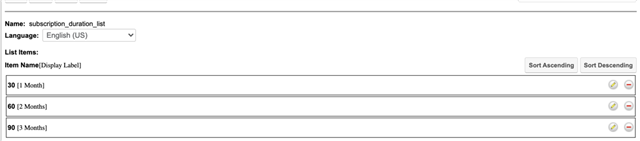
  • I see, thank you. We have decided to go with

    31 = 1 Month
    61 = 2 Months
    91 = 3 Months

    1 extra day versus 1 less day is better for our customers :) 

    Since if subscription starts at July 1, if 30 days, it will be July 31st subscription end date.

    While 31 days will be September 1.

  • If that works for you then it's perfect and saves you from some coding. 

    I bet the customers will also be happy with an extra subscription day. Wink

  • Unless subscription starts in February Thinking

    .

    CRM Business Consultant

  • Yea, if to know the pitfalls about adding days to dates, one would think twice about using adddays to automate the calculation like this :)

    When the calc field calculates the wrong value, it is impossible to fix the value manually. 

    That is why IMHO logic hooks configuring or using BPM is the best option to automatize such calculations (help the human with calculation, so that human could adjust the value) rather than to automate calculation (make it instead of a human with no chance to adjust the results).

    Automatizing could be done with no Sugar coding experience

    Best Regards,
    Dmytro Chupylka

    integroscrm.com
    We make work in Sugar CRM system faster, more convenient and efficient

  • Just got a request today that reminded me this topic of 2021. 

    The logic for creating a custom SugarLogic expression that adds months is actually pretty straightforward, and in this case, I believe it’s the best approach.

    Here’s what I built:

    custom/include/Expressions/Expression/Date/AddMonthsExpression.php

    <?php
    
    /**
     * <b>addMonths($date, $months)</b><br>
     * Returns a date object moved forward or backwards by <i>$months</i> calendar months.<br/>
     * ex: <i>addMonths(date("2024-01-15"), 2)</i> = "2024-03-15"
     */
    class AddMonthsExpression extends DateExpression
    {
        public function evaluate()
        {
            $params = $this->getParameters();
    
            $date = DateExpression::parse($params[0]->evaluate());
            if (!$date) {
                return false;
            }
            $months = (int)$params[1]->evaluate();
    
            $modifier = ($months < 0) ? "$months month" : "+$months month";
    
            return $date->modify($modifier);
        }
    
        public static function getJSEvaluate()
        {
            return <<<EOQ
            var params = this.getParameters();
            var fromDate = params[0].evaluate();
            if (!fromDate) {
                return '';
            }
    
            var months = parseInt(params[1].evaluate(), 10);
            if (_.isNaN(months)) {
                return '';
            }
    
            var date = SUGAR.util.DateUtils.parse(fromDate, 'user');
            var d = new Date(date);
    
            var targetMonth = d.getMonth() + months;
            d.setMonth(targetMonth);
    
            if (this.context.view) {
                d = App.date.format(d, 'Y-m-d');
            }
    
            return d;
    EOQ;
        }
    
        public static function getOperationName()
        {
            return 'addMonths';
        }
    
        public static function getParameterTypes()
        {
            return ['date', 'number'];
        }
    
        public static function getParamCount()
        {
            return 2;
        }
    
        public function toString()
        {
        }
    }


    After adding this file and Rebuild Sugar Logic Functions the new formula addMonths() it's exposed on the SugarLogic Builder. 


    With this formula, we can accurately add days, months, and years to a specific date using custom fields.

    If the number of days, months, and years are stored in the fields number_of_days_c, number_of_months_c, and num_years_c, respectively, we can perform a precise date calculation with the following SugarLogic formula:

    addDays(addMonths(addMonths($start_date_c,$number_of_months_c),multiply($num_years_c,12)),$number_of_days_c)


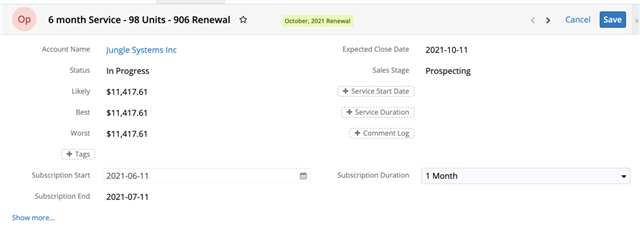
    The end result with be something like this: 


    I hope this helps. 

    Cheers, 

    André