Report on dashboard - limit to 1 line

Hello,

If I use a report in a dashboard and one of the item as a long value, the item will create a large line because the value is fully displayed.

For exemple :  
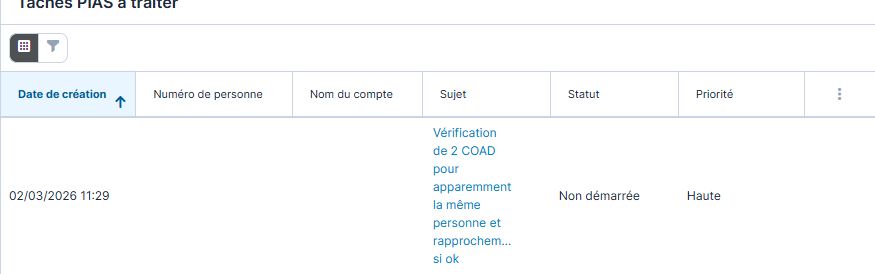

Unfortunately I can't use a viewlist, which limits to 1 line.

Do you know if there is a way to set that up so it displays on 1 line only ?

Thanks

Parents
  • Hi Yves,

    I believe I've found a solution for you, but it requires a minor code customization. In essence, the formatting for that view needs to be altered a slight bit in order to cause it to only use one line and that would be done through CSS.

    The one issue, though, is that this change will also alter the behavior of Rows and Columns reports, as the dashlet in your screenshot is effectively using the same view. In other words, that dashlet and the Reports module are intertwined with each other and you can't easily alter one without altering the other.

    To apply the change, you'll need to create a file named custom.less and add the following to it:

    .dataTablePlaceholder td.wrap-report-text {
    }

    .dataTablePlaceholder td.wrap-report-text .ellipsis_inline {
    }

    .dataTable td.wrap-report-text {
    }

    .dataTable td.wrap-report-text .ellipsis_inline {
    }

    Save the custom.less file to ./custom/themes and then execute a Quick Repair and Rebuild and that should do the trick.

Reply
  • Hi Yves,

    I believe I've found a solution for you, but it requires a minor code customization. In essence, the formatting for that view needs to be altered a slight bit in order to cause it to only use one line and that would be done through CSS.

    The one issue, though, is that this change will also alter the behavior of Rows and Columns reports, as the dashlet in your screenshot is effectively using the same view. In other words, that dashlet and the Reports module are intertwined with each other and you can't easily alter one without altering the other.

    To apply the change, you'll need to create a file named custom.less and add the following to it:

    .dataTablePlaceholder td.wrap-report-text {
    }

    .dataTablePlaceholder td.wrap-report-text .ellipsis_inline {
    }

    .dataTable td.wrap-report-text {
    }

    .dataTable td.wrap-report-text .ellipsis_inline {
    }

    Save the custom.less file to ./custom/themes and then execute a Quick Repair and Rebuild and that should do the trick.

Children
No Data