New Many to Many Relationship, subpanel error - not editable

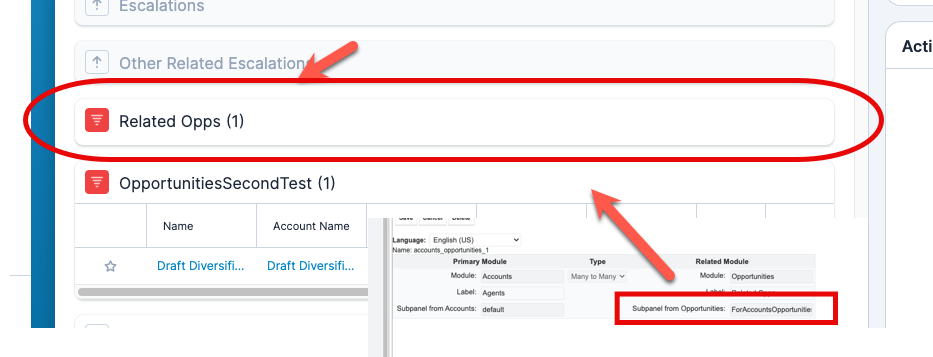
I've created a new many-to-many relationship between Opportunities and Accounts.  The subpanel on the Opportunity module shows up as expected "Agents"; however, on the Account side the related subpanel "Related Opps" appears, but there is no way to edit which fields show.  

In my example, there you can see where the Agent has one opportunity associated with it, but you can't see the details:

When I got to the opportunity, you can see the "agent" details:

Below is the relationship set-up.  
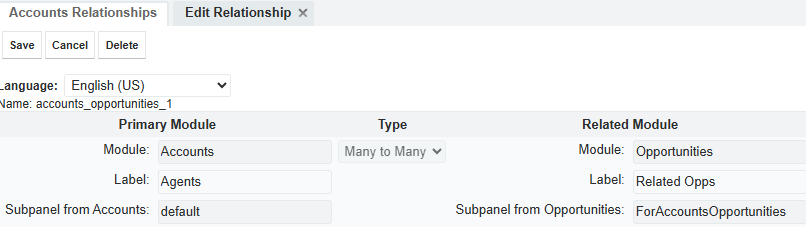
How do I get the "Related Opps" ops to show on the Agents subpanel?

Thank you.

Mary Clouse

USPack Logistics

(407) 374-4980

Parents
  • Hello  , 

    Thanks for creating this post.
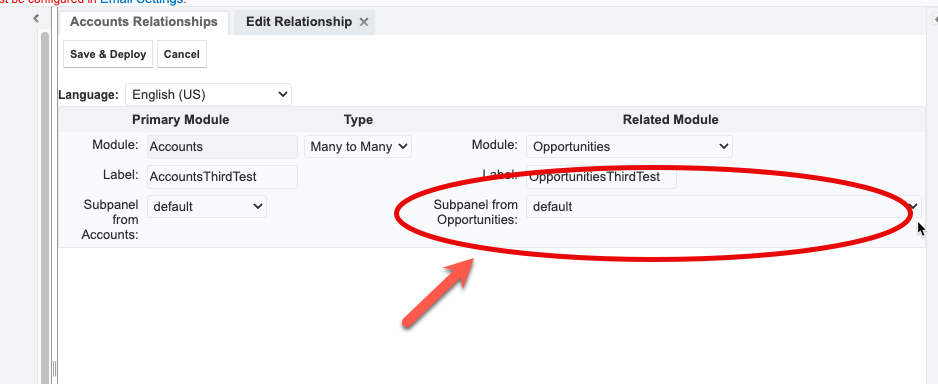
    I was able to reproduce the behavior you’re experiencing, and it seems to be related to the option selected under “Subpanel from Opportunities.”

    As a workaround, I was able to get it working by creating the relationship using the “Default” option instead before saving.
    Could you please check if this works for you and allows you to move forward?

    In the meantime, I’ll reach out to support to open a case and confirm whether this is a known bug in Sugar when this configuration is used.

    Cheers,

    André

  • Andre,

    Thank you for responding.

    Yes, I created a new relationship with both subpanels sent to default and it works as desired. 

    I was then able to go into the subpanel for each module and update the fields shown.

    Thanks again! 


    Mary

    Mary Clouse

    USPack Logistics

Reply Children
No Data