
"No Access" but field is editable

This is clearly MY problem. Does anyone have an idea of where I should focus my research to resolve the issue.

I opened a case with Sugar Support, and we've determined this is MY issue.  Somewhere in a Role, I've apparently set the access to a field in some module to "None".  The result is that a Currency field in the Accounts Module where the Role has Read/Write Access shows as "No Access" but the field can be edited by the user.  When the currency is populated, the amount shows twice. 

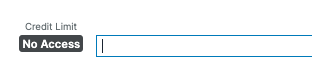
This is what the user sees when editing the field:
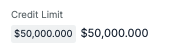
This is what the user in that role sees after populating the field:
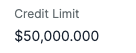
This is what other roles see when the field is populated:
Again, this is clearly something I have set somewhere in the role and I'm trying to find it by creating a new role.  I'm setting the new role's authority to match the prior role for each module a few fields at a time then running a Quick Repair and Rebuild and checking to see if I've replicated the issue.

Does anyone have a suggestion where I should focus my attention to find the field permission that's causing the issue?

P.S. I've discovered that there are a few other roles that have Read Only permission for that filed and those roles cannot edit but see the double value.


  • I have been playing with Gemini to help me debug things in Sugar.

    FWIW below is Gemini's answer to my question about the badge/no badge situation you are seeing.

    From further conversations with Gemini it sounds like you should check field vs module permissions on the Role: if the field access is None and the module access is Edit=All this may cause a "confusion" in how the field is treated.

    Unfortunately the solution that Gemini suggests to hide the field from the user is to use Role Based Views and remove the field for that Role.

    If things are as Gemini says, it seems to me that it's a bug. I would hope that field-level restrictions are enforced regardless of the module-level restrictions.

    It feels strange to suggest this because it would be obvious to you, given your experience, and support, if your understanding of the issue is the same as Gemini's.
    To find where the field permission is set go to the Role/s for that user, for each Role the user has click on Accounts in the left column and check the permissions on the fields itself, if set to None then change it to Not Set so it defaults the same as the Edit at module level.

    Hope this helps,

    FrancescaS

    -----

    What Gemini said:

    This bizarre "double currency" behavior is a specific side-effect of how SugarCRM handles Multiple Currencies in combination with restrictive permissions.

    The reason you see a badge that "transforms" or appears alongside the field is that a single Currency field in Sugar is actually a "composite" of two separate data points: the Amount and the Currency ID.

    Why the badge appears twice (or alongside the field)

    SugarCRM often displays currency in two formats simultaneously if the record's currency differs from the user's preferred currency:

    1. The Transactional Value: The amount in the currency assigned to that specific record (e.g., €500).

    2. The Converted Value: A "grey box" or secondary label showing that same amount converted to the User’s Preferred Currency (e.g., $540).

    The Glitch: When a user has Field Permission: "None", Sugar tries to hide both. However, when the user clicks Edit, the UI "wakes up" the input field to allow data entry.

    • The Badge stays visible because the system still says "You aren't allowed to see the saved value."

    • The Amount appears in the edit box because the user has Module-level Edit rights, so the UI provides a place to type.

    • For the user with full access, Sugar sees no need for a "No Access" warning, so it simply shows the single clean value they are allowed to see.

    Why the badge "changes" into the amount

    This is a rendering delay in the Sidecar user interface.

    • In Detail/Read Mode: The security check runs, sees "None," and overlays the "No Access" badge.

    • In Edit Mode: The UI prioritizes the "Editable" state. It fetches the value to put it in the text box. If the user has permission to edit but not view, the system creates a conflict where the "No Access" badge and the actual value compete for the same space.

  • WOW  , you may have done it again!

    I will look into this on my system - I have a vague recollection of setting a preferred currency in some places.  The explanation sounds so reasonable!  This could be the answer, and the Sugar Support folks didn't know about this possibility.  I've been chasing detailed permissions in each module for the affected role.

    I'll be back to confirm what I find!

    Bud Hartley | Cape Foulwind, NZ (and Oregon, USA)