Action Button to create Document

We are using Sugar Enterprise v25.1.

I am trying to create an Action Button to show on the Contract record. The button is supposed to create a document which will house the fully executed contract file.

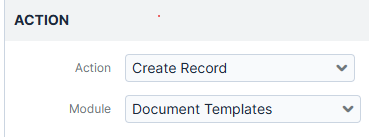
When I configure the button and try to find "Document" from the module list, I can find several modules, but not "Document".

I double checked that the "Document" module is available, not hidden.

I double checked that the "Document" module is listed in my "Display Modules" list.

I double checked that I'm using the correct Action type -> "Action Button".

Why am I not able to see the "Document" module listed? 
Thanks for any help.

Parents
  • Hello  , 

    I believe   may already be pointing toward a possible solution, but I’m still not entirely sure I’m understanding the exact requirement.

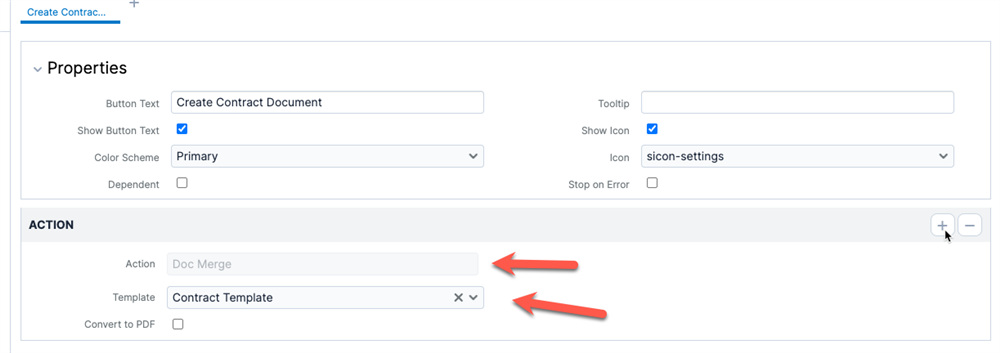
    From your description, it sounds like you want the Action Button to create a document automatically. If that’s the case, are you expecting Sugar to generate the document itself, possibly using DocMerge?

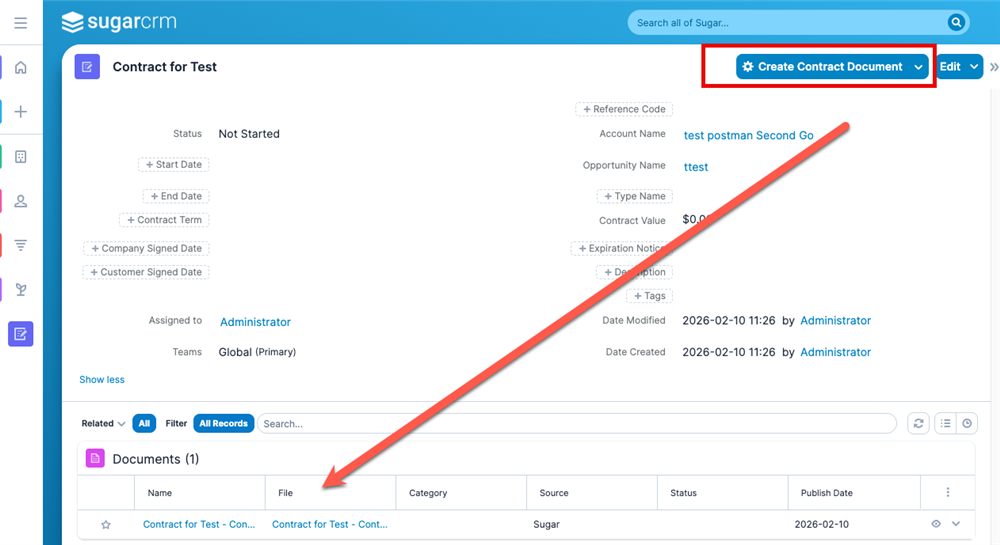
    If so, this can be achieved through the following Action Button configuration. With that setup in place, the button will be visible and, when clicked, it will generate a Word file and attach it to the related Contract as a record in the Documents module.


    If that’s not the intended outcome, could you clarify what should happen when the user presses the button?

    For example:

    • Should the system open the drawer to create a new Document?

    • Should it create a Document record without a file, so the user can upload one afterward?

    • Or is the expected behavior something different altogether?

    A bit more detail on the desired end result would help point to the most suitable approach.


    Many Thanks

    André

Reply
  • Hello  , 

    I believe   may already be pointing toward a possible solution, but I’m still not entirely sure I’m understanding the exact requirement.

    From your description, it sounds like you want the Action Button to create a document automatically. If that’s the case, are you expecting Sugar to generate the document itself, possibly using DocMerge?

    If so, this can be achieved through the following Action Button configuration. With that setup in place, the button will be visible and, when clicked, it will generate a Word file and attach it to the related Contract as a record in the Documents module.


    If that’s not the intended outcome, could you clarify what should happen when the user presses the button?

    For example:

    • Should the system open the drawer to create a new Document?

    • Should it create a Document record without a file, so the user can upload one afterward?

    • Or is the expected behavior something different altogether?

    A bit more detail on the desired end result would help point to the most suitable approach.


    Many Thanks

    André

Children
  • Hi  Thank you for you reply. I understand this core feature.

    However there are scenarios where, as a POs, you want to achieve a successful addoption by offering a very intuitive and easy way to manage documents with a very specific 3 tier segmentation (Type, Category, Subcategory).

    In our case, we implemented a very robust BPM (which has more than 200 elements). This complex BPM orchestrates the journey of Opportunities from its prospecting up to its invoicing. Across the journey several teams have specific responsabilities on the Opportunity, based on its Sub Sales Stage. A given Sub Sales Stage means who (team) should do what (to attach a specific document with a specific segmentation) and when (as soon as the Opportunity reach that specific Sub Sales Stage). That said we have a BPM orquestrated by documents.

    Due to the complexity of the Sales Stage x Sub Sales Stage and huge number of possible combination of Type, Category and Subcategory on Documents module, the users were facing several troubles/mistakes attaching documents.

    The proposed and ellegant solution was to conditionally render buttons based on who is autenticated (user under a specific team), when he/she is authenticated (current Sub Sales Stage) and what should be done (to attach a pre-defined document).

    That said, we managed to create several action buttons which open up the Documents for with Type, Category and Subcategory properly filled in, the way the unique concern of the user is to attach the right file.

    Result: everybody loved it!

    This way we accomplished a error free and successful implementation.

    In short words, being able to create a Document from action button became the Go/No Go milestone.

      feel free to reach me out if you would like to see this bpm and how users play it through documents.

      find attached the installer which introduces this feature on the Studio.

    ActionButton-CreateRecord-Documents.1.zip

    André Lopes
    Lampada Global
    Skype: andre.lampada
  • Hello  and thank you for your reply!

    Here is more detail.

    Once a sales rep closes a contract and gathers all signatures we want them to create the contract record and attach the contract file. The easiest way I came up with is to create the Action Button that will open a Document record for the user to then upload the contract file.

    When clicking the Action Button and opening the Document record I also want to pre-populate most fields that will help identify the contract file.

    My current challenge, however, is that when building the Action Button and setting action "Create Record", I cannot see "Document" on the list of offered modules.

    Does this help?