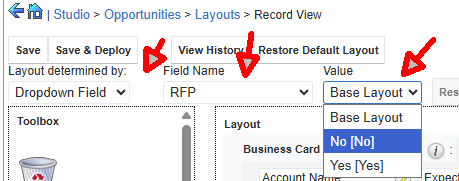
Conditional tab in record layout by using Studio only

Hi there,

Situation :  we want to add a RFP tab (a panel would do too) to the Opportunity layout, a tab that only needs to be visible if the RFP flag is set for that opportunity.

Searching the web for a solution I found out that Sugar Logic using the visibility attribute of the panel can handle that ,  but it would require also a .php file etc... That's beyond my capacity.

I was wondering : can it be done with only using Studio ?

Thanks for your advice,

;-)

Hugo

Parents
  • Hi Hugo,

    This method requires the "RFP Flag" to be a Dropdown (e.g., values "Yes"/"No") rather than a Checkbox, as Studio does not support layout switching based on checkboxes.

    Navigate: Admin > Studio > Opportunities > Layouts > Record View.
    Find the "Layout Determined By" dropdown at the top.
    Select "Dropdown Field".
    Choose your RFP Status dropdown field.
    Default/No: Configure the layout without the RFP tab.


    Then select "Yes" in the value dropdown, then add a New Panel (display it as a tab if your system settings allow) and populate it with your RFP fields.
    Save & Deploy.

    Hope that helps

    Vincent

    .

    CRM Business Consultant

Reply
  • Hi Hugo,

    This method requires the "RFP Flag" to be a Dropdown (e.g., values "Yes"/"No") rather than a Checkbox, as Studio does not support layout switching based on checkboxes.

    Navigate: Admin > Studio > Opportunities > Layouts > Record View.
    Find the "Layout Determined By" dropdown at the top.
    Select "Dropdown Field".
    Choose your RFP Status dropdown field.
    Default/No: Configure the layout without the RFP tab.


    Then select "Yes" in the value dropdown, then add a New Panel (display it as a tab if your system settings allow) and populate it with your RFP fields.
    Save & Deploy.

    Hope that helps

    Vincent

    .

    CRM Business Consultant

Children