Hello,
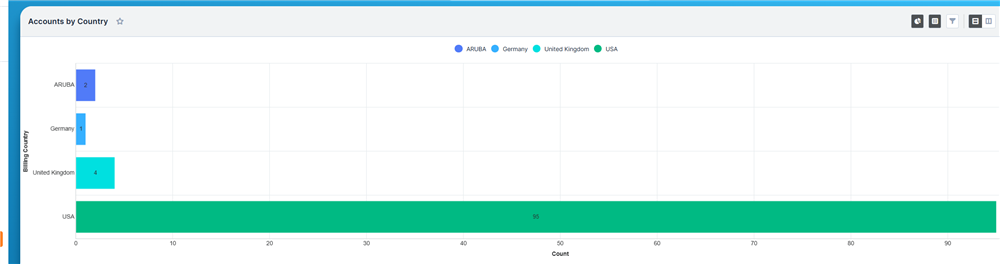
Unfortunately, the bar charts in reports and dashlets are sorted alphabetically.
Is there a trick to sort them by bar size?
Any tips or workarounds would be greatly appreciated!
Thanks
Steffen
Hello,
Unfortunately, the bar charts in reports and dashlets are sorted alphabetically.
Is there a trick to sort them by bar size?
Any tips or workarounds would be greatly appreciated!
Thanks
Steffen

Hello Steffen Scheid ,
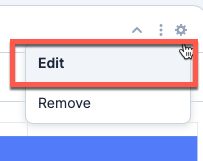
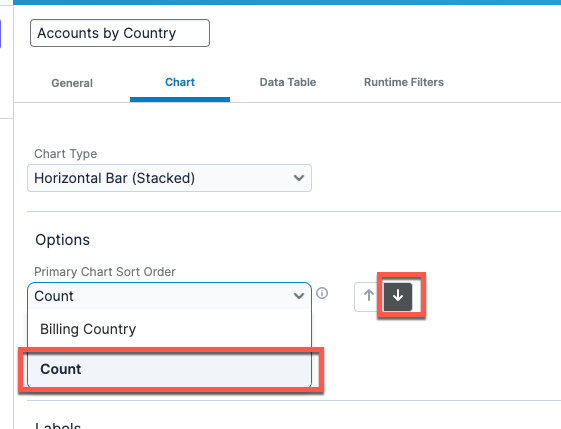
If I understand the scenario correctly, on this exact dashlet you need to go to to the Dashlet Options: 
And in the Chart Primary Sort Order, choose, Count
This will sort the Chart by Bar Size as it represents the number of Accounts of each Country.
I am not sure that this will work for all the scenarios you have, but I am confident that it will work for the example that you've shared.
Let us know if this helps.
Cheers,
André
hi Andre Serrazina
Amazing! it works for dashlets! thank you
Do you know if there any option to achieve similar ordering in the report chart view?
Best Regards,
Dmytro Chupylka
integroscrm.com
We make work in Sugar CRM system faster, more convenient and efficient
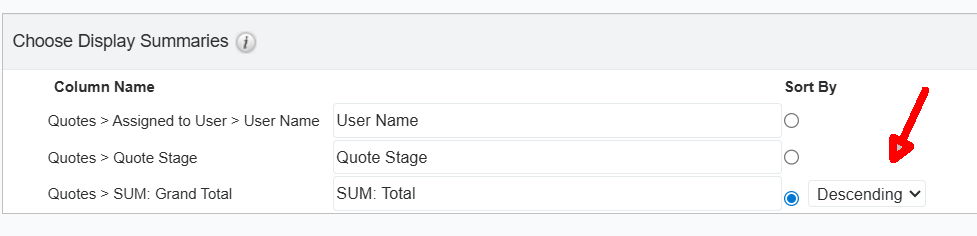
You can, by using the appropriate field and sort option

.
CRM Business Consultant
You can, by using the appropriate field and sort option

.
CRM Business Consultant
Vincent Amari aha, works for Summation type of reports.. thank you!
Best Regards,
Dmytro Chupylka
integroscrm.com
We make work in Sugar CRM system faster, more convenient and efficient