Docmerge displaying if and else tags

Hiya, 

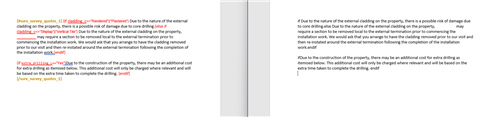
I am creating a docmerge template with a lot of if/else conditions using || for or and && for and conditions in it. I am testing in sections and have noticed that the if/else isnt working and the if and else tags are being left in the rendered document. Is there something wrong in the coding i have set up? or is this a bug? Screenshot below of the codeing on the left and result on the left.
Parents
  • Hi Ross, there are a couple of syntax issues in your example. If you fix these, it might resolve the weird behavior you're seeing:

    1. {else if} should actually be {elseif} with no space.
    2. The proper formatting for && and || is as follows:
      1. {if cladding_c == "Rendered" || cladding_c == "Plastered"} (and likewise for the other condition with || in your example)

    As a side note, you should also only use straight quotes, not "smart quotes" that some word processors use. It appears that you are using straight quotes in your example, but I thought I'd mention it just in case!

    If you make those changes, does that clear up the unexpected output?

    -Brenda

  • I have updated the text and now get a different issue. I have pasted the text below to check formatting. I am now getting Error: Unexpected token '||'. I have another DocMerge issue as well but ill post a new question.

    {#surv_survey_quotes_1}

    {if cladding_c == "Ship Lap" || "Vertical Tile" || "Rendered" || "Plastered"}The property has a {cladding_c} finish on the external façade. The cladding was in {lbl_cladding_condition_c} at the time of the survey. {endif}

    {if cladding_c == "Rendered" || "Plastered"}Due to the nature of the external cladding on the property, there is a possible risk of damage due to core drilling.{elseif cladding_c == "Shiplap" || "Vertical Tile"} Due to the nature of the external cladding on the property, CUSTOMER may require a section to be removed local to the external termination prior to commencing the installation work. We would ask that you arrange to have the cladding removed prior to our visit and then re-instated around the external termination following the completion of the installation work.{endif}

    {if extra_drilling_c == "Yes"}Due to the construction of the property, there may be an additional cost for extra drilling as itemised below. This additional cost will only be charged where relevant and will be based on the extra time taken to complete the drilling. {endif}

    {/surv_survey_quotes_1}

  • Hey Ross, it looks like the formatting for the use of || is still off. Here is what it is currently vs the correct format:

     Current:  

    {if cladding_c == "Ship Lap" || "Vertical Tile" || "Rendered" || "Plastered"}

     Corrected:

    {if cladding_c == "Ship Lap" || cladding_c == "Vertical Tile" || cladding_c == "Rendered" || cladding_c == "Plastered"}

    The difference is that you can't join multiple things with a || after the equals sign. Each A == B condition is standalone, which basically just means you have to repeat cladding_c == [value] a lot - once for each value you want to check.

    You will need to make the same change for the || statements in the second paragraph. I also see "CUSTOMER" in all caps in the second paragraph - is that intended to be a variable possibly? It could also be capitalized for emphasis, in which case please disregard me. Smiley

    -Brenda

  • Hey Brenda,

    im getting the same error after the corrections. Would we be able to hop on a meet to go through it together or with someone from the team if possible?

Reply Children
  • That is strange, I have tested the same conditionals using stock fields and it works as expected. I also don't see any known issues around this, but maybe you are the lucky one to discover a possible issue. Slight smile Would you mind filing a case with Support so they can help you look into it further? You can share a link to this thread to give them some of the context.

    If you and Support end up figuring out the issue, it would be nice if you could come back here and let us know the verdict too, if you don't mind.

    Thank you and sorry I wasn't able to get it figured out!

  • Hi Brenda, i think i have found more information on this issue. It seems to be if you use pipes on the same field options, like i am above. i have another file using pipes but the condition uses a different field and works fine. i will raise a support ticket.

    Example

    {if lbl_flued_appliance_c == "Yes" || lbl_wood_burner_c == "Yes"}We will not install an extract fan in the same room as an open flued appliance or a wood burner. Mechanical ventilation provision in other areas may require a gas spillage test.{if lbl_flued_appliance_c == "Yes" || lbl_wood_burner_c == "No"}We will not install an extract fan in the same room as an open flued appliance. Mechanical ventilation provision in other areas may require a gas spillage test.

  • Hmm, I did use the same field in both conditions in my test, although I was using the Type field on the out-of-the-box Accounts module. Here is an example of a condition I used that worked:

    {if account_type == "Customer" || account_type == "Competitor"}

    So it seems like yours should also work, but maybe we are missing something or you are encountering unexpected behavior. Let us know what you find out with Support!

    -Brenda