
Hi There,
I am looking to change the buttons label of alert confirmation box on the basis of particular module .
For ex : As per below screenshot , i would like to change these button labels for one module.
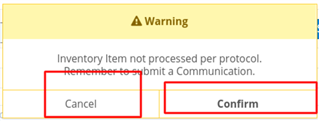
Please suggest me any solution for that .
Hi There,
I am looking to change the buttons label of alert confirmation box on the basis of particular module .
For ex : As per below screenshot , i would like to change these button labels for one module.

Please suggest me any solution for that .
Neeraja P Please suggest me any way to achive this , I will be greatful to you
I've not tried this but I always start by looking at the original code and trying to reverse engineer it.
In this case I looked at the view for alerts: clients/base/views/alert/*
clients/base/views/alert/confirmation.hbs
shows the labels as being
alert.cancelLabel
alert.confirmLabel
in clients/base/views/alert/alert.js
you can see that these come from the alert option if there is one or the LBL in the language files:
this.confirmLabel = this.options.confirm.label || 'LBL_CONFIRM_BUTTON_LABEL';
this.cancelLabel = this.options.cancel.label || 'LBL_CANCEL_BUTTON_LABEL';
From there you can explore how to best set the label:
If this is a case by case change add an option to your alert call:
https://support.sugarcrm.com/Documentation/Sugar_Developer/Sugar_Developer_Guide_10.0/User_Interface/Alerts/
If this is a global change you want for all confirmation alerts change the label:
https://support.sugarcrm.com/Documentation/Sugar_Developer/Sugar_Developer_Guide_10.2/Architecture/Languages/Application_Labels_and_Lists/
Hope this gets you on the right track,
FrancescaS
I've not tried this but I always start by looking at the original code and trying to reverse engineer it.
In this case I looked at the view for alerts: clients/base/views/alert/*
clients/base/views/alert/confirmation.hbs
shows the labels as being
alert.cancelLabel
alert.confirmLabel
in clients/base/views/alert/alert.js
you can see that these come from the alert option if there is one or the LBL in the language files:
this.confirmLabel = this.options.confirm.label || 'LBL_CONFIRM_BUTTON_LABEL';
this.cancelLabel = this.options.cancel.label || 'LBL_CANCEL_BUTTON_LABEL';
From there you can explore how to best set the label:
If this is a case by case change add an option to your alert call:
https://support.sugarcrm.com/Documentation/Sugar_Developer/Sugar_Developer_Guide_10.0/User_Interface/Alerts/
If this is a global change you want for all confirmation alerts change the label:
https://support.sugarcrm.com/Documentation/Sugar_Developer/Sugar_Developer_Guide_10.2/Architecture/Languages/Application_Labels_and_Lists/
Hope this gets you on the right track,
FrancescaS