The client’s application remains stuck in offline mode, and even after switching to online mode, it continues to operate offline despite active network availability. This issue is directly impacting the client's production operations.

Problem Statement:
The client’s application remains stuck in offline mode, and even after switching to online mode, it continues to operate offline despite active network availability. This issue is directly impacting the client's production operations.
 
Detailed Description:
The client is experiencing a persistent issue where the application does not transition to online mode once it has gone offline, even when a stable network connection is present. They are currently using an older SDK version (83.0.831-1.4.2-2). While we understand that the SDK is outdated, we would like to understand what specific conditions or system behaviours could cause such an issue.
 
This is a custom application; however, we have not altered any core functionalities. All development has been done strictly through extensions, and there are no custom features that could interfere with this part of the core offline/online logic.
 
We have tested the scenario across multiple environments and network conditions, but we have been unable to replicate the issue on our end, including:
  • Device Simulator
  • 2G Network
  • Wi-Fi
  • Regular broadband/mobile data
  • Client’s 5G network environment
Despite these repeated tests across different conditions, we have been unable to identify the root cause or find a workable resolution.
The client reports that on the vanilla app downloaded from the Play Store, the issue does not occur — it successfully switches to online mode. This further increases their concern, and they are becoming increasingly impatient as this affects day-to-day operations.
We are ready to share the relevant code snippets for your review, should you require them.

We kindly request your assistance in helping us identify the possible root causes of this behaviour and guide us on the next steps toward resolution. Understanding what in the SDK, configuration, or environment could cause the offline mode to remain stuck would be highly valuable for troubleshooting. If required, we are will open a Sugar Development Support ticket for the same.
  • Hi Chetan,
    Please take you time to study these docs: https://support.sugarcrm.com/documentation/mobile_solutions/sugarcrm_mobile/sugarcrm_mobile_app_user_guide/#Transaction_Log

    In your case application can be 'stuck' in offline mode if some transaction (create, update, detele, etc operation) can not be synced with server for some reason (e.g. server error, no access, or smth)

    Something like this could have happened:

    - User goes offline

    - User does some modification to a record

    - User goes back online

    - Sugar Mobile tries to sync changes made while offline with server but fails

    - In this case Sugar Mobile will stay in offline mode and queue all further operations after initial operation

    - but no operations will go to server until initial transaction is resolved (this is done to preserve data consistency)

    So in your case you should debug this scenario to see if this is what really happens.

    Potentially, do this with customer's instance clone to observe custom instance peculiarities

    Then investigate why some transactions (error codes, see server logs, etc) are not accepted by the server

    Hope this helps, Eugene

  • Thanks  !!

    During a troubleshooting session with the client, we tested three different APK versions:

    1. Old SDK with customisations (83.0.831-1.4.2-2)
    2. Old SDK without customisations (83.0.831-1.4.2-2)
    3. Latest SDK without customisations (87.0.850-1.4.2-2)

    Observations:

    • On Device A, all three APKs worked without any issue.
    • On Device B, all three APKs displayed the offline mode message.

    This indicates that the issue is not related to the customisations or the usage of an older SDK version.

    Additional findings:

    • Both devices were on the same network, and on the device where the issue occurred, other apps and internet connectivity were functioning normally.
    • When we logged in using the affected user credentials on Device A (where apps were functioning), the login worked without any issue.
    • However, logging in with the same user credentials on Device B reproduced the offline mode issue.
    • The client also confirmed that the issue occurs randomly for different users, suggesting it may be related to specific user accounts rather than the device or app build.
    • We checked pending transactions at the time of issue reproduction, and there were none.
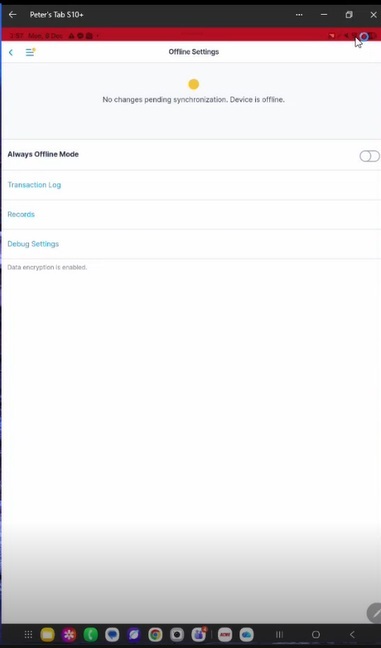
    • We have attached the relevant screenshot showing the offline message for clarity.

    We would like to schedule a call with your team to discuss potential root causes and next steps for identifying and resolving this behaviour.


    If helpful, we can also share a video recording of the troubleshooting session (cropped to the relevant portion). Please confirm if you would like us to provide it.


    Looking forward to your guidance.

  • Hi Chetan
    I am glad to hear that you are making progress
    However as this issue is so tightly related to a specific device I don't think there is any help that we can provide from our side

    I suggest you to do the following:

    1. build your app in debug mode

    2. after that you will be able to connect to WebView using standard Android/iOS methods
    https://developer.chrome.com/docs/devtools/remote-debugging/webviews

    https://medium.com/@atifqamar29/debugging-ios-webviews-on-safari-browser-822def097497

    3. or debug in your desktop chrome

    4. click through the app, use steps that are known to cause issues,  and inspect console for errors and network tab for AJAX errors

    maybe this will help you to get on the right track

  •   Will check this!! and Update,

    Please go through the image below I forgot to upload in last msg. The device is online for other applications still it is show offline in Sugar & internet is on