For our final Social Club of the year, we wrapped up 2025 with a deep dive into Sugar Logic, focusing on calculated fields, formulas, and automating data insights in Sugar. Whether you're looking to simplify sales dashboards, build dynamic filters, or improve how data is displayed on records, this session was full of practical examples and take-home value. A huge thank you to Kim Troy (kimtroy) for leading the session and walking us through some of her favorite Sugar Logic tips and tricks!
Kim kicked things off with an overview of calculated fields and what makes Sugar Logic such a valuable part of CRM customization. She shared examples for counting records, setting dynamic values, and displaying useful information directly on records. Many of the formulas covered were useful for both reporting and everyday field-level clarity.
Here are a few favorites that were discussed during the session:
|
Sugar Logic |
Description & Use |
Example Module > Field |
Example Formula |
Example Use Cases |
|
daysUntil |
Counting the number of days between two dates |
Account > create integer field |
abs(
    subtract(
        daysUntil($last_interaction_date),
        daysUntil(today())
    )
)
|
|
|
countConditional |
Counting the number of related records that meet specific criteria |
Account > create integer field |
countConditional(
    $opportunities,
    "sales_stage",
    createList("Closed Won")
)
|
|
|
rollupConditionalSum |
Calculating the sum of a currency field on related opportunities that meet specific criteria |
Account > create currency field |
rollupConditionalSum(
    $opportunities,
    "amount",
    "sales_stage",
    createList(
        "Negotiation/Review",
        "Proposal/Price Quote"
    )
)
|
|
|
maxRelatedDate |
The most recent date on a related record |
Account > create date field |
maxRelatedDate(
    $opportunities,
    "date_entered"
)
|
|
|
concat |
Populating a field value with two or more pieces of text together |
Notes > create textfield |
concat(
    related($created_by_link,"first_name"),
    " ",
    related($created_by_link,"last_name"),
    " - ",
    toString($date_entered)
)
|
|
|
isinList |
Making a field conditionally visible if it meets specified criteria |
Opportunity > create textfield |
isInList(
    $sales_stage,
    createList("Closed Won","Closed Lost")
)
|
|
|
dayofweek |
Assigning a numeric value to a date field based on the day of the week |
Case > create integer field |
dayofweek(
    today()
)
Use BPM to assign # days to add based on day of week – if Friday, add 3 so not to count weekends |
|
We explored several ways to apply these formulas in real scenarios, including:
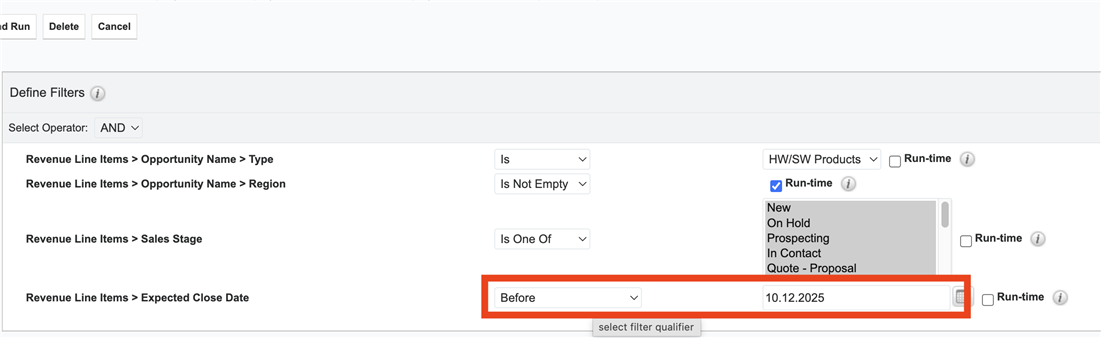
Overdue Opportunity Filters:
We discussed a use case about how to filter opportunities with an Expected Close Date "before today" in reports. Kim suggested using BPM to flag records as "Overdue" based on a days-until-close calculation. This flagged field can then be used in reports or dashboards.
Conditional Action Buttons:
Kim also demonstrated how to use calculated values within Action Buttons, including limitations when trying to use fields from a related record that doesn't exist yet. This sparked a discussion about how to structure formulas and whether default values can help mitigate these gaps. Some helpful links include:
Localized Salutations in Email Templates:
We discussed regional language formatting for fields. In Germany, salutation fields are used to set proper gender-based greetings (e.g., "Liebe Kim" vs. "Lieber Alex"). This helpful formula was shared, acknowledging that there are some limitations to it:
ifElse(contains($salutation,"Frau"),"Sehr geehrte","Sehr geehrter")
Field Update Timing:
The group was reminded that calculated fields only update on record save, an important note when relying on these values in active workflows or reporting; however, the Sugar Services team has some solutions for this that can be implemented.
SLA Logic Based on Day of Week:
We briefly touched on using the dayofweek() function to calculate SLAs that skip weekends, especially when assigning due dates.
Thanks again to Kim for closing out the year with such an informative and collaborative session! Her walkthrough gave attendees immediate tools to take back to their systems, and we look forward to seeing what Sugar Logic creativity you bring into 2026.
Until next time, happy holidays, and thank you for being part of the SugarClub community! 



