Best practice to match a core Dropdown field between modules

Hi all,

What is the best practice to match a core Dropdown field between modules, when it only exists in one module OOTB?

I'm sure this comes up often enough, so wondering how others address this issue.

example; the Industry dropdown in Accounts is very useful, however it doesn't exist OOTB in any other module, i.e. Leads, therefore if you add industry_c into Leads using the same Dropdown it won't carry over during conversion.

If configuring a new Sugar instance, we simply create industry_c in Accounts module to solve this but on an existing instance where the OOTB field has been used for many years on thousands of records it would require a lot of work to both migrate the data from industry to industry_c field, and also update all the reports that use it.

I'd be very interested to hear how others manage this, and if Sugar product team has this field and others under consideration to resolve the issue?

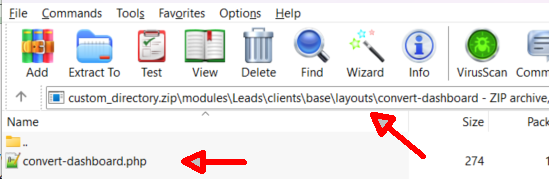
  • hi  
    I downloaded the Custom directory, and the path you mentioned doesn't see to exist?


    and the convert-dashboard.php file has the following contents;

    <?php
    // created: 2025-10-03 14:00:50
    $viewdefs['Leads']['base']['layout']['convert-dashboard'] = array (
      'components' => 
      array (
        0 => 
        array (
          'view' => 'product-catalog',
        ),
        1 => 
        array (
          'view' => 'product-quick-picks',
        ),
      ),
    );

  • Hi  ,

    Your screenshot is showing the ./custom/modules/Leads/clients/base/layouts/convert-dashboard/ directory which does not apply to this functionality. If you don't have the ./custom/modules/Leads/clients/base/layouts/convert-main/ directory, you should be able to generate it by going to Admin > Studio > Modules > Leads > Layouts > Convert Lead and then clicking 'Save'.

    Regarding your question of Prospect > Lead conversions, this same method would not apply since there isn't a 'convert' layout to configure. When converting a prospect, Sugar redirects you to the standard lead creation flow with fields populated. If you want custom field mappings where the field names are not identical between the two modules to show during the conversion process, I believe you would need custom coding to achieve that outcome. If you are ok with having those custom field mappings populate after prospect conversion, you can achieve that with SugarBPM for some field types. 

    Chris