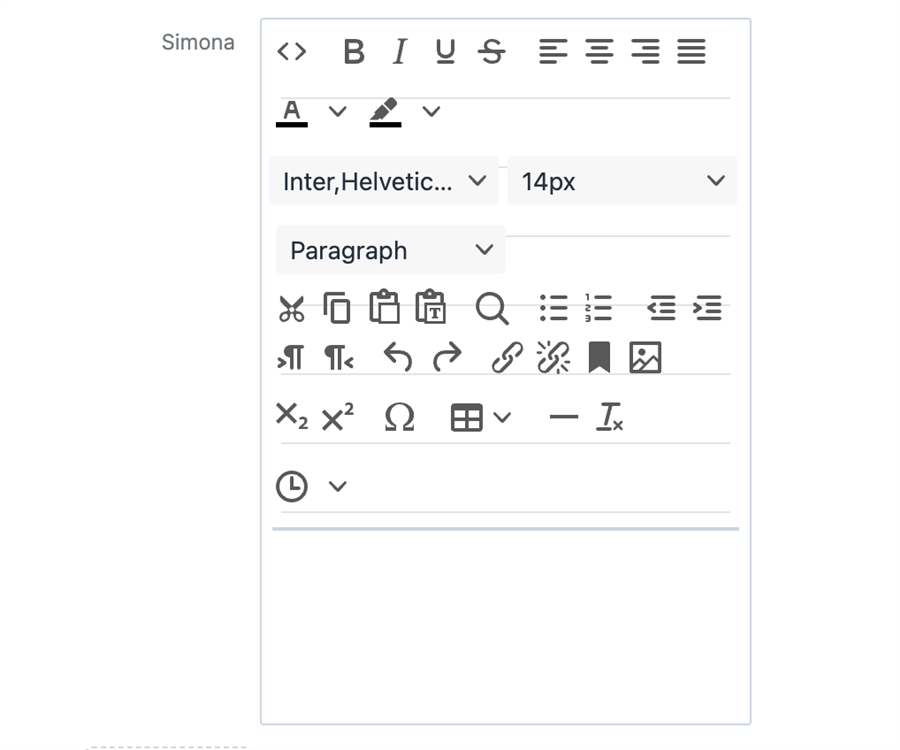
Hello everyone, been a while since being here. Just having an issue with our instance which is now running as 25.2. We have fields incustom modules that I changed to TinyMCE editor fields, this was all working till the recent update and now none of them display. Has sugar changed how these fields are generated?. I remember when I did this is usesed the html field in KBContents as a template
in our Product Class Module we have a Features field that was created in studio then the vardefs file changed to
/  created: 2021-01-12 12:15:52
$dictionary['p_Productclass']['fields']['printer_features_c']['type'] = 'htmleditable_tinymce';
$dictionary['p_Productclass']['fields']['printer_features_c']['dbType'] = 'longtext';
$dictionary['p_Productclass']['fields']['printer_features_c']['len'] = '8388608';
also added modules/p_Productclass//clients/base/fields/htmleditable_tinymce/htmleditable_tinymce.js
/**
 * @extends View.Fields.Base.Htmleditable_tinymceField
 */
({
    extendsFrom: "Htmleditable_tinymceField",

    getTinyMCEConfig: function () {
        return {
            // Location of TinyMCE script
            script_url                              : 'include/javascript/tinymce6/tinymce.min.js?v=' + this.tinyMCEVersion,
            // Force loading of current version of tinyMCE plugin
            cache_suffix                            : '?v=' + this.tinyMCEVersion,
            plugins                                 : 'anchor,importcss,advhr,insertdatetime,preview,searchreplace,' +
                                                    'help,directionality,footnotes,spellchecker,wordcount,contextmenu,' +
                                                    'charmap,codesample,hr,lists,paste,autoresize,visualblocks,template' +
                                                    'textcolor,table,emoticons,autolink,code,image,mediaembed,link', //media
            browser_spellcheck                      : true,
            theme                                   : 'silver',
            schema                                  : 'html5',
            skin                                    : app.utils.isDarkMode() ? 'oxide-dark' : 'oxide',
            // content_css: [
            //     app.utils.isDarkMode() ? 'dark' : 'default',
            //     'styleguide/assets/css/sugar-theme-variables.css',
            //     'styleguide/assets/css/iframe-sugar.css',
            // ],
            body_class                              : app.utils.isDarkMode() ? 'sugar-dark-theme' : 'sugar-light-theme',

            // User Interface options
            min_height                              : 500,
            menubar                                 : true,
            statusbar                               : false,
            resize                                  : true,
            toolbar_mode                            : 'wrap',
            keep_styles                             : false,
            contextmenu                             : 'image link | cut copy paste pastetext | inserttable cell row column deletetable',
            toolbar1                                : 'code | blocks | bold italic underline strikethrough subscript superscript | bullist numlist | indent outdent | alignleft aligncenter alignright alignjustify | forecolor backcolor | insertdatetime | removeformat',
            toolbar2                                : 'undo redo | cut copy paste pastetext | image mediaembed | blockquote charmap hr | link unlink openlink anchor | table | footnotes footnotesupdate | emoticons | codesample | spellcheckdialog spellchecker wordcount | insertdatetime',
            link_target_list                        : [
                {
                    text                            : app.lang.getAppString('LBL_TINYMCE_TARGET_SAME'),
                    value                           : ''
                },
                {
                    text                            : app.lang.getAppString('LBL_TINYMCE_TARGET_NEW'),
                    value                           : '_blank'
                }
            ],

            // Output options
            entity_encoding                         : 'raw',

            // URL options
            relative_urls                           : false,
            convert_urls                            : false,

            // Insert image
            file_browser_callback                   : _.bind(this.tinyMCEFileBrowseCallback, this),

            // Allow image copy&paste
            paste_data_images                       : true,
            images_upload_handler                   : _.bind(this.tinyMCEImagePasteCallback, this)
        };
    },
})
since 25.2 our fields are just blank as below

i conteacted support but they claimed sugar nver supported a html editor, even though I know it did in the knowledge base module. anyone else had this issue and able to resolveit?