Data archiver - what's happening in the back end?

I have a lot of questions about Data Archiver and what happens in the backend when you archive a module's records without deleting the records.

I'll start with one scenario: Say I archive all Closed Cases created 5 or more years ago.

  • Do the cases_audit entries get deleted or archived?
  • Do the emails linked to the Case get archived? I would consider these "orphaned" if the case is gone.
  • What happens to the relationships between Cases and other modules? Are they also archived?
    • e.g do cases_bugs, accounts_cases, contacts_cases etc. for those cases get archived?
  • What about attachments to case related Notes? is there an uploads_archive on the file system?

thanks,
FrancescaS

  • Hi Francesca,

    You always have to pique my curiosity, don't you? ;)

    I went and looked at the related code and it seems like different things happen based on whether you are performing a hard delete or just archiving. 

    In the case of the audit data, it is purged if you are performing a hard delete operation, but if you are archiving, nothing happens to it and is effectively orphaned. 

    As for the linked emails and other relationships, similar logic seems to apply to that data in that if you perform a hard delete, the data is purged, but if you are just archiving, nothing happens to it.

    Lastly, with regards to uploads, we don't have a way to archive attachments and the only consideration they are given within the context of the data archiver functionality is that it deletes the file should the Notes module be the target of the archive operation.

    If you are interested in taking a look at the code, check out ./src/DbArchiver/DbArchiver.php, the bulk of the work stems from performProcess().

    Hope that helps.

  • I do my best to keep things interesting for you Wink

    Thank you for the details! 

  •   
    what are the chances of extending the current features of the Data Archiver, to deal with the ever growing Audit tables? Wink 

    .

    CRM Business Consultant

  • We will forward your comment as a suggestion for future enhancements.

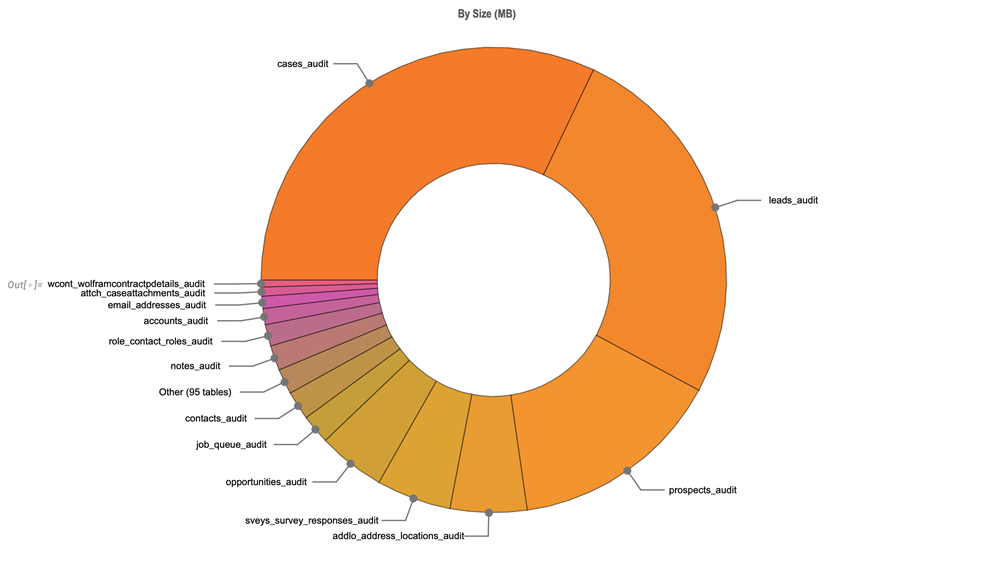
  • I just did an audit, using queries and our own Wolfram Language, of my database.

    The audit tables after using sugar for 15 years are HUGE.


    cases_audit is second only to emails_text (emails_text is more than a quarter of the database by itself).
    All of the audit tables added up have 139,684,074 rows of data!


    I am now leveraging  's team's  UpsertLens to review the vardefs for every module starting from the ones with the biggest audit logs.

    The goal is to determine:

    - what really needs to be audited in each module

    - how long to keep the audit in Sugar

    From there we will need to figure out different strategies for different modules. 

    I've already determined that we want to turn off auditing on Prospects and we can truncate that table, we're cutting Cases down to 3 years and with about half as many audited fields as we have today.

    A tool to manage audits separately from other forms of archiving wold be great, so we can define retention periods per module.

    Francesca

  •  

    I am still struggling with Archiving data...

    Does Sugar have a good strategy to share for archiving?
    Do you know of any customers successfully archiving their data other than a table by table approach?

    Archiving data from a single table can create orphans all over the place, both actual orphans with tables with orphan Foreign Keys, and conceptual orphans, for example what's the point of keeping case emails without the case to thread them together?

    Archiving by date also doesn't always make sense, I may not have changed an Account in years, but I may have all sorts of things linked to that account since then because they are an old and very active customer...

    FrancescaS

  • I am not sure I've seen a "clean" approach, for the reasons you've highlighted, i.e. the related data is problematic.

    In some cases we've had customers simply purge data they felt they no longer needed. This tends to require a bit of collaborative work to ensure the corresponding SQL queries target the appropriate data, etc.

    In other cases, customers have taken a backup from a cutoff date and then used that to stand-up a local instance used for archive purposes only, then purged all the old data from the production instance using the cutoff date as the criteria for all tables.

    The latter is probably the more common technique I have seen with the added benefit that the archived data is more easily retrieved. It is tedious, but seems to work well. It does also require discipline on the part of users to know they have to go to a different URL to see old data, but that's not a difficult ask in my opinion.